Unity Editor extension for Git review, semantic diff, and 3-way merge workflows

MergeSight

Review & Merge Unity Assets


Understand changes. Merge without fear.

Semantic Review 3-Way Merge CLI Automation
Unity-native understanding See changes the way Unity sees them.
Safe by design Preview, validate, backup. Only then apply.
Automate with CLI CI checks, merge drivers, and standard VCS workflows.

Built for Unity teams. Works with Git.

MergeSight semantic Unity asset review interface

The Problem

Unity assets were not made for raw text review.

Git sees YAML lines. Unity teams need objects, components, hierarchy, references, and property changes.

Assets/Game/Scenes/MainPreview.unity

GameObject &1001object identity
156--- !u!1 &1001
157GameObject:
158 m_ObjectHideFlags: 0
159 m_CorrespondingSourceObject: {fileID: 0}reference
160- m_Name: Main Camera
160+ m_Name: Camerarename
161 m_TagString: MainCamera
164- m_StaticEditorFlags: 0
164+ m_StaticEditorFlags: 1flags
165... unrelated serialized fields ...
Camera component &2050split block
243--- !u!20 &2050
244Camera:
246 m_CorrespondingSourceObject: {fileID: 1001}source
249 m_GameObject: {fileID: 1001}attached
251- m_FieldOfView: 60
251+ m_FieldOfView: 45property
252 m_NearClipPlane: 0.3
253 m_FarClipPlane: 1000

Real scene refactoring with major hierarchy reshaping: in raw YAML, moved nodes, reordered children, and property edits blend into noisy text blocks.

Hierarchy

Raw lines do not show where the object sits.

WorldEnvironmentCamera

References

fileID links are hard to validate by eye.

Properties

Values change without showing Unity intent.

FOV 60FOV 45

Components

One Unity change is split across blocks.

GameObjectCamera

Powerful by design

One tool for reviewing, resolving, and automating Unity asset changes.

MergeSight covers the full path from understanding a Unity asset change to safely applying merge decisions.

Semantic Review

See Unity changes in Unity terms.

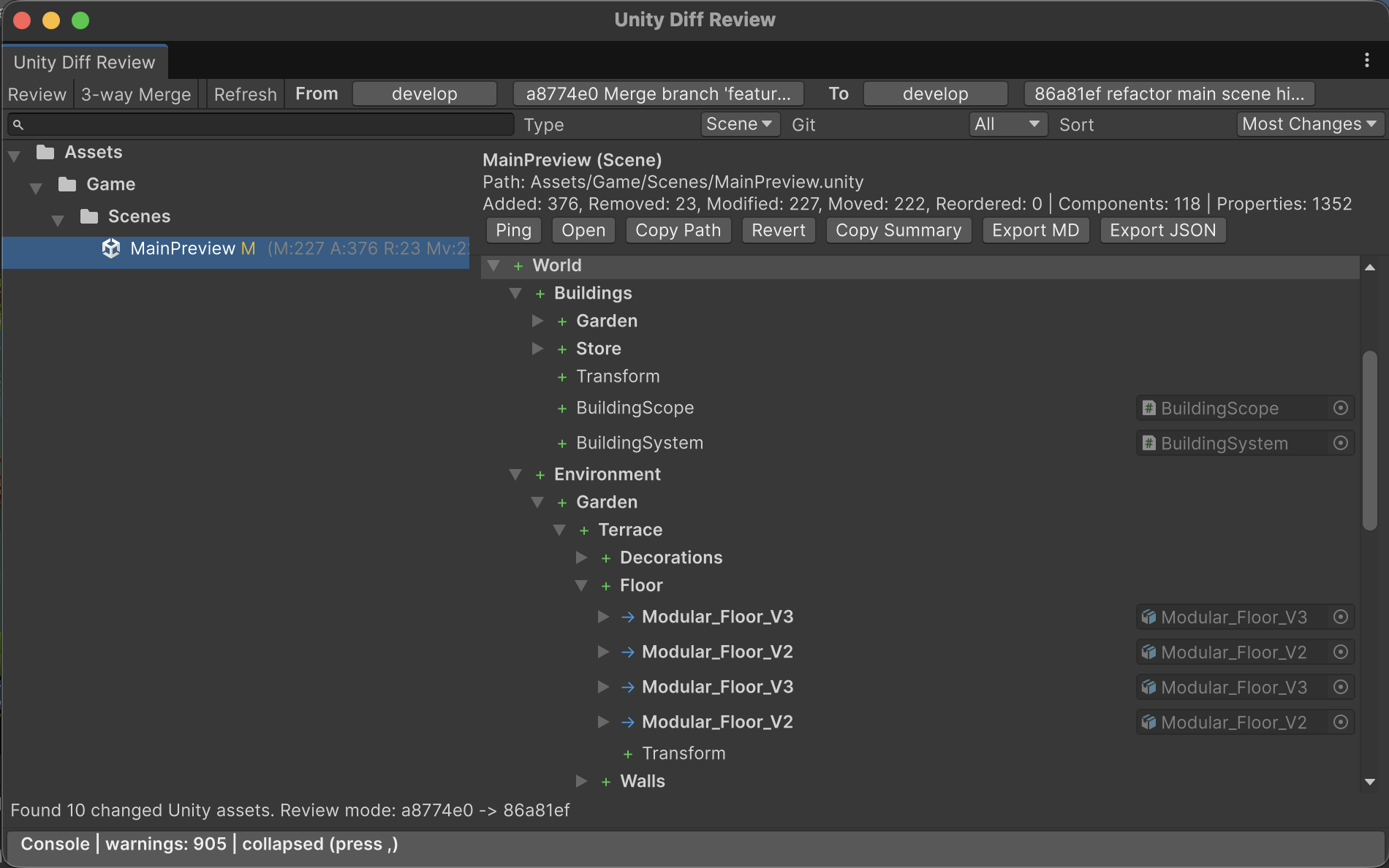
Review scenes, prefabs, hierarchy, components, references, and Git context without reading raw YAML.

Changed assets onlyStart with scenes and prefabs that changed.
Review scope filtersFilter by type, status, path, and change count.
GUID & referencesExpose GUIDs, fileIDs, and target assets before a broken link ships.
Branch contextKeep source revisions visible while reviewing.
MergeSight semantic review of changed Unity scene assets

3-Way Merge

Resolve conflicts with context.

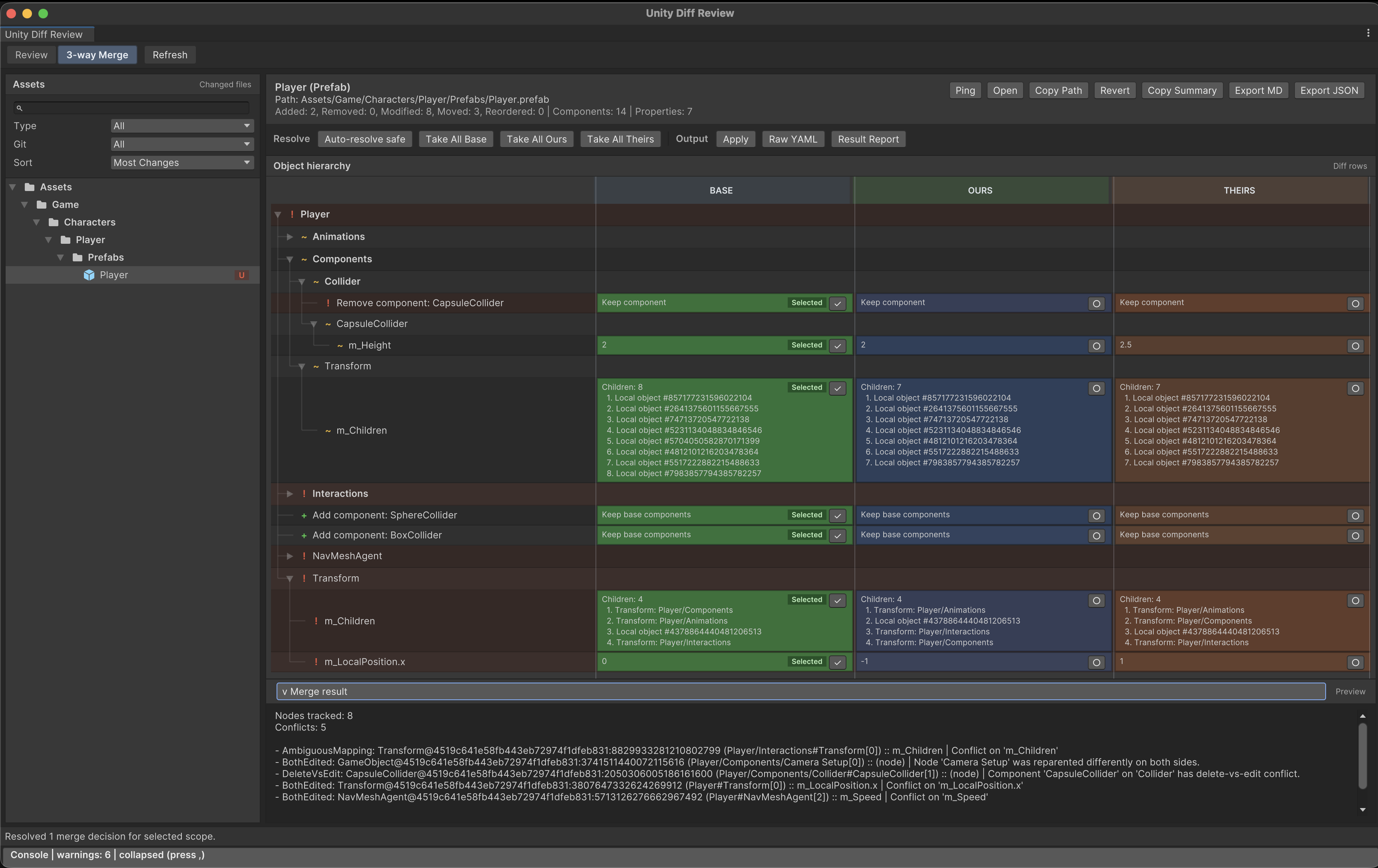
Choose Base, Ours, or Theirs at the right level, preview the result, and apply only when every required decision is resolved and validated.

  • Base / Ours / TheirsCompare changes side-by-side with full Unity context.
  • Conflict classificationAutomatically classify conflicts and highlight risk.
  • Auto-resolve safeApply safe decisions automatically, then review the rest.
  • Preview before applySee the exact result before writing any changes.
  • Backup and validationBack up originals and validate after merge.
MergeSight 3-way merge workflow preview

CLI Automation

Merge checks for CI pipelines

Use the packaged .NET CLI for fast CI checks, semantic merge artifacts, Git merge-driver mode, and detected VCS merge-tool workflows.

  • CI checksinspect, check, auto-plan, validate-plan
  • Git merge-driversemantic safe decisions from Git workflows
  • VCS out of the boxGit, Perforce, Unity Version Control, and SVN workflows
Packaged .NET CLI
CI ready
Libraries/StandaloneCLI/bin/mergesight.dll

Run

$ dotnet Libraries/StandaloneCLI/bin/mergesight.dll check

Run CI-safe validation over Unity text assets and fail when unresolved or unsafe merge state is detected.

merge-check.json exit code 0

Use Cases

Built for every Unity asset workflow.

Give developers, artists, designers, and automation pipelines the context they need to review and merge Unity assets safely.

Unity Developers

  • Review scene, prefab, material, and .asset changes
  • Resolve BASE / OURS / THEIRS conflicts
  • Protect main branch from broken asset merges
  • Inspect object, component, property, and reference diffs
  • Export Markdown or JSON summaries for PR reviews

Technical Artists

  • Understand prefab overrides and nested prefab changes
  • Review material keywords and saved property changes
  • Check object references without hunting GUIDs
  • Validate hierarchy, ownership, and missing scripts
  • Escalate only ambiguous merge decisions

Level Designers

  • See hierarchy, reparenting, reorder, add/remove changes
  • Review scene edits before pushing or opening a PR
  • Catch accidental object, transform, or component edits early
  • Understand teammate scene changes before merging
  • Keep level work moving without reading raw YAML

Automation / CI / VCS

  • Run CI checks that fail on unresolved decisions
  • Generate merge models, decision plans, previews, and reports
  • Auto-resolve only engine-proven safe decisions
  • Use Git merge-driver mode for safe automated merges
  • Integrate Git, Perforce, UVCS, SVN, and generic VCS workflows

VCS Support

Review & merge with standard VCS out of the box.

Use Git, Perforce, Unity Version Control, and SVN workflows with Unity-aware review and 3-way merge as soon as MergeSight detects your repository.

GitRepository detected
PerforceWorkspace detected
Unity Version ControlProject detected
SVNWorking copy detected
MergeSight Unity-aware VCS engine Repository detected
Semantic ReviewObject-level Unity changes
3-Way MergeBASE / OURS / THEIRS

Workflow

From raw Unity YAML to a merge you can trust.

MergeSight turns text-serialized Unity assets into a structured review flow, keeps risky decisions explicit, and writes only after preview and validation.

01

Analyze Unity YAML

Parse asset files into stable Unity identities.

104--- !u!1 &381924
105GameObject:
-m_Name: EnemySpawner
+m_Name: WaveSpawner
131m_Component:
+- component: {fileID: 99172}
148m_LocalPosition: {x: 4, y: 0, z: 2}
02

Review in Unity structure

See objects, components, hierarchy, and properties.

S
SampleScene.unityscene root
changed
G
WaveSpawnerGameObject renamed
rename
C
EnemyWaveControllercomponent added
add
P
Transform.positionx changed from 2 to 4
03

Preview and apply safely

Validate the result before writing changed files.

OK
Safe decisionsAuto-resolved when intent is unambiguous.
5
!
Needs reviewAmbiguous conflicts stay visible.
3
->
Preview, backup, validateApply only after the merge result checks out.
ready

Supported assets and requirements

MergeSight is an Editor and automation workflow for Unity projects using text serialization.

Primary support

Primary support covers these text-serialized Unity asset types.

.unity .prefab .asset .mat

VCS detection can also recognize Unity text asset patterns such as .physicMaterial, .anim, .controller, and .overrideController.

Requirements

  • Unity project using text serialization for assets.
  • Git workflows require Git access from the project checkout.
  • Standalone CLI usage requires a compatible .NET runtime.
  • Intended for Editor and automation workflows, not runtime builds.

Feature matrix

Area Capability Why it matters
Review Semantic diff tree Understand object-level changes quickly.
Review Branch/commit compare Review Unity changes across real Git workflows.
Review Export summaries Share readable change reports with your team.
Merge 3-way conflict model Resolve Base/Ours/Theirs with Unity context.
Merge Auto-resolve safe Let the tool handle only proven safe decisions.
Merge Preview and validation Write only after the result is ready.
CLI CI checks Detect unresolved Unity asset merges in automation.
CLI Git merge-driver mode Use semantic auto-safe merging from Git.
VCS Out-of-box VCS support Review and merge through Git, Perforce, Unity Version Control, and SVN workflows.

Unity Asset Merge Tools

Unity merge workflows comparison

Most tools solve one part of the problem. MergeSight covers review, merge, validation, and automation.

Feature MergeSight Recommended UnityYAMLMerge Git merge driver File locking Generic text diff
Text YAML merge Partial
Unity semantic context
Visual Unity YAML asset diff Partial
GUID & reference visibility Partial
Review asset filters Partial
Branch/commit comparison Partial
Prefab overrides & nested prefabs Partial Partial
3-way merge Partial Partial
Preview before apply
Validation checks
CI automation Partial Partial

Conclusion: MergeSight is best when the team needs the full Unity asset merge workflow, not just a merge command.

FAQ

Does MergeSight work at runtime?

No. MergeSight is an Editor and automation tool. It is not a runtime package and is not intended to ship in player builds.

Does it require a web service?

No. Core review and merge features run locally.

Can it resolve every merge conflict automatically?

No. MergeSight is safety-oriented. It can auto-resolve safe cases, but ambiguous or unsupported conflicts require explicit user decisions or manual cleanup.

What tools can merge Unity assets?

Unity teams usually combine UnityYAMLMerge, Git or VCS merge drivers, Perforce or Unity Version Control locking, generic diff tools, and MergeSight for semantic review, transparent 3-way decisions, preview, validation, and CI artifacts.

What is the best Unity merge tool for scenes and prefabs?

UnityYAMLMerge is the baseline built-in option for automatic scene and prefab Smart Merge. MergeSight is the better fit when reviewers need Unity context, transparent Base/Ours/Theirs decisions, preview, validation, and CI automation.

Can MergeSight merge Unity assets?

Yes. MergeSight supports 3-way merge workflows for text-serialized Unity assets such as .unity, .prefab, .asset, and .mat files, with semantic conflict classification, preview before apply, backups, and validation.

Does MergeSight work with UnityYAMLMerge?

Yes. UnityYAMLMerge can stay in the workflow for simple automatic cases, while MergeSight adds transparent review, explicit conflict decisions, preview, validation, and CI-readable artifacts when a black-box merge result is not enough.

When should teams choose MergeSight over UnityYAMLMerge?

Use UnityYAMLMerge as a baseline Smart Merge tool for automatic scene and prefab YAML merges. Choose MergeSight when the team needs transparency: semantic review of what changed, visible Base/Ours/Theirs decisions, conflict classification, merge preview, validation warnings, and CI artifacts instead of treating the merge result as a black box.

Can MergeSight show Unity scene and prefab changes visually instead of raw YAML?

Yes. MergeSight presents text-serialized Unity assets as Unity-aware review data, so scene and prefab changes can be inspected as objects, components, properties, references, prefab overrides, and hierarchy changes instead of only raw YAML lines.

Can MergeSight show GUIDs, fileIDs, and Unity references?

Yes. MergeSight surfaces Unity identity and reference data such as GUIDs, fileIDs, object references, and changed asset links so reviewers can understand what a YAML change points to before merging.

Can MergeSight compare Unity assets between branches or previous commits?

Yes. MergeSight supports branch and commit comparison workflows for Unity assets, helping teams review scene, prefab, material, and YAML asset changes before a merge or pull request is accepted.

What should I do when UnityYAMLMerge fails or produces an unclear result?

Keep UnityYAMLMerge as the baseline automatic merge tool, then use MergeSight when the result needs review. MergeSight helps inspect the Base/Ours/Theirs state, preview the merged output, validate the result, and leave CI-readable evidence instead of trusting an unclear black-box merge.

Does MergeSight help with prefab variants, nested prefabs, and prefab overrides?

Yes. MergeSight focuses on Unity-aware review for prefab overrides, nested prefab relationships, and variant-style changes so teams can inspect what changed and what will be written before applying a merge.

Can artists or non-programmers review Unity merge conflicts with MergeSight?

Yes. MergeSight is built as a Unity Editor GUI review workflow, so technical artists, level designers, and other non-programmers can inspect Unity asset changes through a GUI instead of manually reading YAML conflict markers.

Can level designers review Unity scene merge conflicts without reading YAML?

Yes. MergeSight shows scene merge conflicts in Unity terms such as GameObjects, components, properties, references, hierarchy changes, and prefab overrides, so level designers can review the result without reading raw YAML.

Can MergeSight show what changed in a Unity scene before a merge is applied?

Yes. MergeSight supports preview-before-apply workflows for Unity scenes, prefabs, materials, and YAML assets, so reviewers can check object placement, component values, references, and overrides before writing the merged result.

Does MergeSight help when multiple level designers edit the same scene or prefab?

Yes. MergeSight does not replace file locking for high-risk assets, but it helps teams review, classify, preview, and validate scene or prefab conflicts when parallel edits happen in Git, Perforce, Unity Version Control, or SVN workflows.

Which asset types are supported?

Primary support covers .unity, .prefab, .asset, and .mat text-serialized Unity assets.

Can it integrate with Perforce or Unity Version Control?

Yes. MergeSight detects Git, Perforce, Unity Version Control / Plastic SCM, and SVN repositories and enables Unity-aware review and 3-way merge workflows out of the box.

Is there a standalone desktop merge tool?

No. MergeSight includes the Unity Editor UI and a standalone .NET CLI library, but not a separate desktop mergetool app.

Get MergeSight when the Asset Store release is ready.

Leave your email to receive launch news, documentation updates, and availability details for MergeSight.

Short form, no spam. We will only send launch-relevant updates.